
How to Add HTML to GoDaddy Website Builder
GoDaddy Websites + Marketing (W+M) gives you one tool for outside code: the HTML section. This page shows how to add HTML to GoDaddy with it, what the Forced Height field does, and which ElectricBlaze widgets fit its limits.
How GoDaddy custom code works
The GoDaddy builder is template-based, and custom code lives in a section of its own. The HTML section accepts HTML, CSS and JavaScript, and GoDaddy places whatever you paste inside an iframe, a separate frame embedded in the page.
That design has three consequences worth knowing before you start:
- Code stays in its frame. It cannot restyle the rest of the site or pin itself to a corner of the browser window.
- No site-wide injection. GoDaddy states that Websites + Marketing does not support site-wide or more complex code, so every page needs its own HTML section.
- Height is set per section. Content inside an iframe may not resize the frame, which is why the Forced Height field exists.
GoDaddy support explains how the section works but does not debug third-party code, so keep the ElectricBlaze snippet exactly as copied.
Adding HTML to GoDaddy Website Builder pages
Grab your GoDaddy website builder embed code first: open the widget in ElectricBlaze and press Add to website. Then continue in GoDaddy.
-
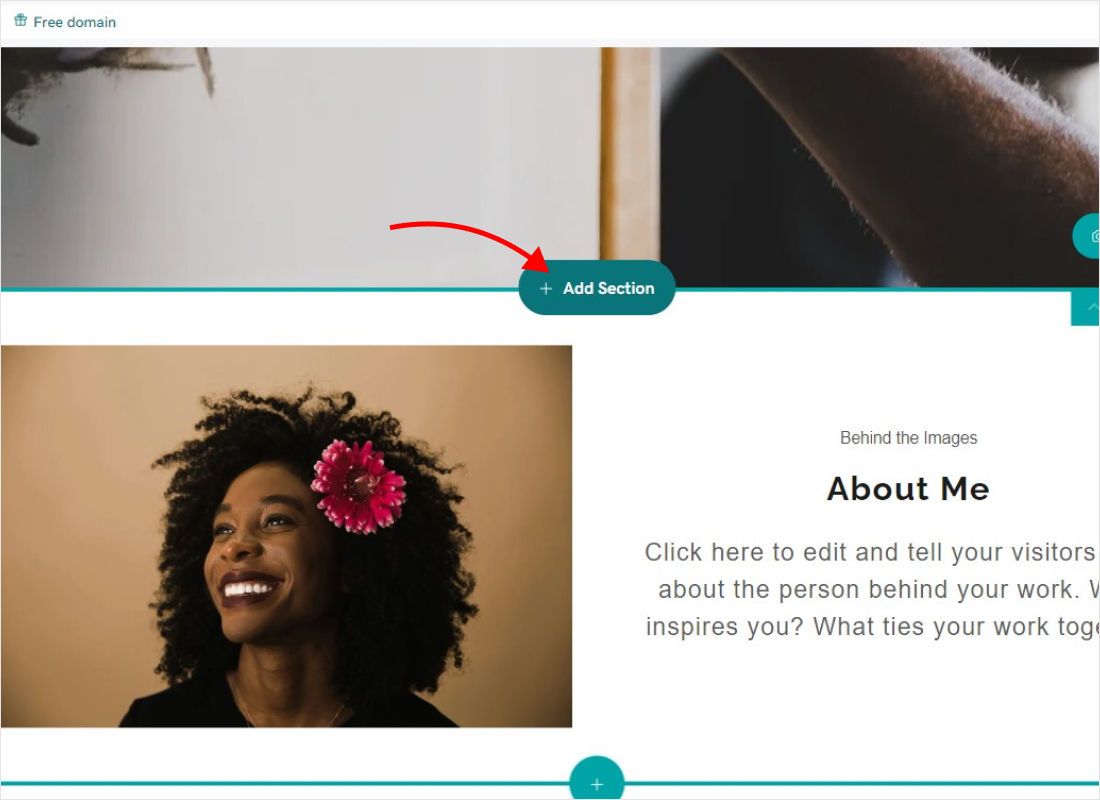
Open your site in the GoDaddy editor, go to the page and hover where the widget should appear. Click Add Section.
-
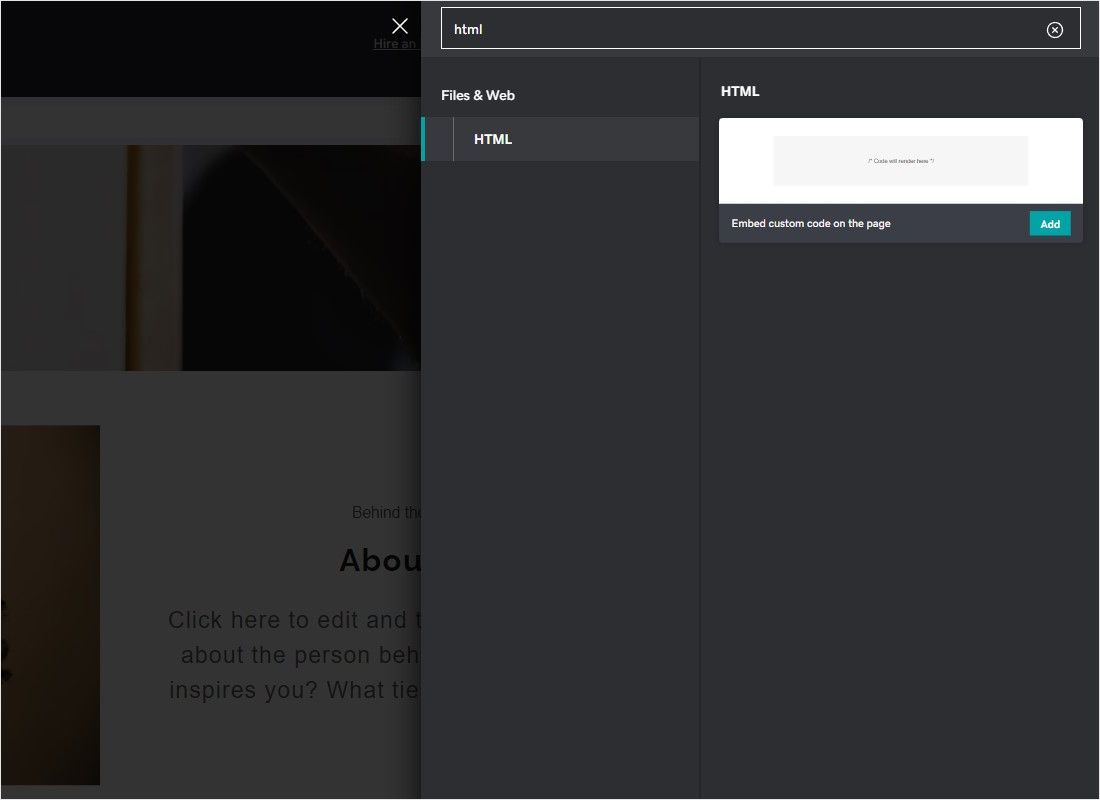
Type HTML into the search box, find the HTML section under Files & Web and click Add.
-
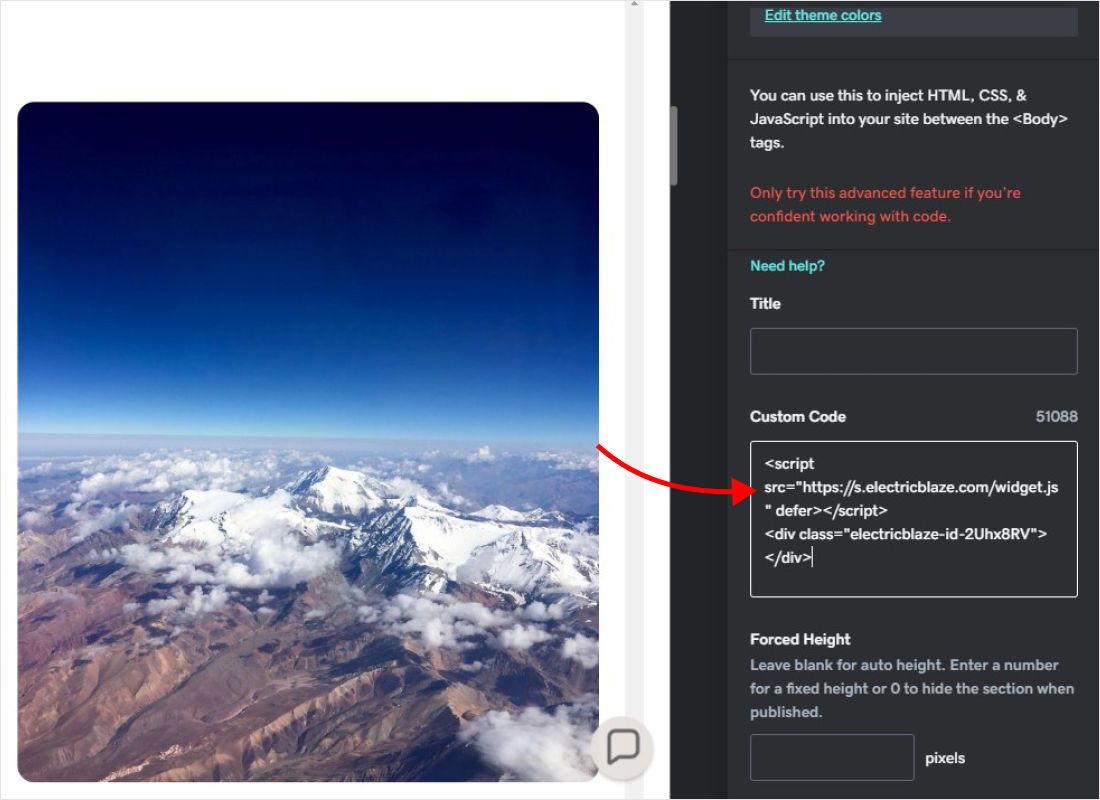
Paste the code into the Custom Code field. Leave Forced Height empty for automatic height or enter a value in pixels. Changes save automatically.
-
Click Preview to check the section, then Publish the site.
A Forced Height of 0 hides the section on the published site. It is handy for testing, but easy to forget.
Which widgets fit the GoDaddy HTML section
Good fit: feeds, galleries and the shop
Anything designed to sit inside the page works well. Put the section where visitors expect it, such as a feed below your About text. If the bottom is cut off after publishing, enter a Forced Height slightly larger than the content; GoDaddy recommends a fixed value for embeds whose height changes as people interact.
Needs embed mode: the music player
The floating bar of the Music Player would be trapped inside the frame. Switch the widget to embed mode on its Layout tab and it becomes a normal block with the height you choose.
Limited: the popup chat
A chat button meant to float over every page cannot do that from an iframe; at best it appears in the corner of the section. If a chat icon on every page is essential, GoDaddy’s own Conversations chat widget or a builder with body-level code are the realistic alternatives.
GoDaddy embed code not working?
- The section is empty. Enter a higher Forced Height; GoDaddy suggests a value such as 40 pixels when an embed does not appear at all.
- The widget is cut off. Raise Forced Height, reduce the rows or switch to a slider layout.
- Preview breaks after an edit. GoDaddy mentions this in Edge and a few other browsers. Refresh the editor or use Chrome.
- Layout does not adapt on phones. Code inside an iframe may not be responsive, so check the mobile preview and prefer fewer columns.
- Links open inside the frame. Links in custom code should open in a new tab.
Once the section works you rarely need to return to it: new posts and setting changes flow in from ElectricBlaze by themselves.
GoDaddy widgets: step-by-step guides
Each guide covers the settings that work inside a GoDaddy HTML section for that particular widget.
-

How to add Instagram Feed to GoDaddy
-

How to add TikTok Feed to GoDaddy
-

How to add YouTube Feed to GoDaddy
-

How to add Twitter Feed to GoDaddy
-

How to add Twitch Feed to GoDaddy
-

How to add Facebook Feed to GoDaddy
-

How to add Popup Chat to GoDaddy
-

How to add Music Player to GoDaddy
-

How to add Pinterest Feed to GoDaddy
-

How to add Vimeo Feed to GoDaddy
-

How to add Simple Shop to GoDaddy
GoDaddy HTML: FAQ
How do I add HTML code in GoDaddy Website Builder?
Click Add Section, search for HTML, add the section and paste your code into Custom Code. Preview, then publish.
Is there a site-wide field for GoDaddy custom code?
Not for general scripts. The GoDaddy add HTML code option is the HTML section, which works page by page. Settings only offer ready integrations such as Google Analytics or the Facebook Pixel.
How to add HTML to GoDaddy domain names without a website?
A domain on its own has no pages to hold code. Connect it to a Websites + Marketing site or another host first, then add the HTML section there.
Can I edit the HTML of my GoDaddy template?
No. Websites + Marketing does not expose the template source; you can only add code inside HTML sections.
Does JavaScript run in the HTML section?
Yes. GoDaddy accepts HTML, CSS and JavaScript there, which is what the ElectricBlaze snippet needs.
Get embed code for GoDaddy
Make a free widget, copy the code and paste it into an HTML section.
Create a widget