
TikTok Widget for Your Website
Turn your TikTok profile into a section of your site. Connect the account once, pick between gallery and slider and paste a single snippet: this TikTok widget for website pages links visitors straight to your latest clips and updates on its own.
Experiment with the editor below. Flip between Gallery and Slider and tweak the options; the preview matches the block that will sit on your page.
TikTok feed widget at a glance
Short vertical videos travel well beyond the app. These are the pieces that bring them to your pages.
Account connection in one window
Press “Connect TikTok account”, sign in through the pop-up and grant access to your videos. There are no links to collect by hand.
Gallery and Slider
Line clips up in rows for a browsing experience, or keep them in a sideways strip that uses little vertical space.
Every clip leads to TikTok
Visitors tap a video and land on the original post, where they can watch, like, comment and follow you.
New uploads picked up for you
Post as usual. The widget collects recent videos once a day on Free and every hour on Start.
Made for phones
Vertical video and small screens belong together, and the layout scales to whatever column width it is given.
Reusable snippet
Drop the code on a homepage, a product page and a second domain; restyle it in the editor and each copy follows.
Gallery or slider: laying out your clips
Vertical videos need more height than photos, so choosing the layout of a TikTok widget for website pages matters more than usual.
Gallery
A gallery shows several clips side by side, row after row. It shines on a page built around your content: a “Watch” or “Tutorials” page, a creator portfolio or a campaign landing page where people expect to browse. On a homepage, keep it short so the offer below stays within easy reach.
Slider
A slider keeps clips in one line that visitors move through. Use it where space is tight: under a product description, beside a newsletter form or across the footer. It proves the account is active without pushing the rest of the page down.
Where short videos help most
- Product pages: unboxings and try-ons answer questions that photos leave open.
- Tutorial and recipe pages: a quick demo next to written steps helps people who learn by watching.
- Event and venue pages: clips from past nights set expectations better than any description.
- About page: behind-the-scenes footage introduces the people who run the business.
What short videos do for a website

More interaction with your videos
A clip on your site is an invitation to continue on TikTok. People who tap through can like, comment, share and move on to the next video, which is exactly the activity creators want around their posts.
That interaction comes from traffic you already have, not from an extra promotion budget.

A wider audience in both directions
Website visitors who rarely open the app discover your profile and may start following it. Viewers who met you in the app can reach your site through the same content, and some of them become customers or subscribers.
One set of videos serves two audiences instead of being produced twice.
Content that explains itself
A product in motion, a before-and-after or a thirty-second tip often gets the point across faster than a paragraph. Reusing clips you already filmed adds that clarity to your pages with no extra production work.
Who benefits from TikTok videos on website pages
Online stores
Unboxings, styling ideas and customer reactions sit beside the buy button and give shoppers more confidence.
Creators and influencers
A media kit or personal site shows current work to brands, next to your photo grid from Instagram, instead of a stale list of links.
Beauty and fitness studios
Transformations, routines and quick tips show results in a way still photos struggle to match.
Restaurants and bars
Clips of cocktails being mixed or dishes being plated make the menu page feel alive.
Teachers and coaches
Bite-size lessons from your account work as a free preview right next to course sign-up, while full-length lessons from your channel cover the details.
Musicians and performers
Snippets of rehearsals and live sets keep fans watching between releases and tours.
How to embed TikTok feed on website
Plan on a few minutes. You will need your TikTok login and permission to edit the site where the clips will be shown.
-

Go to a.electricblaze.com and create an account at no cost, or sign in if you are already a user.
-

Choose Create New Widget, then pick TikTok Feed in the widget list.
-
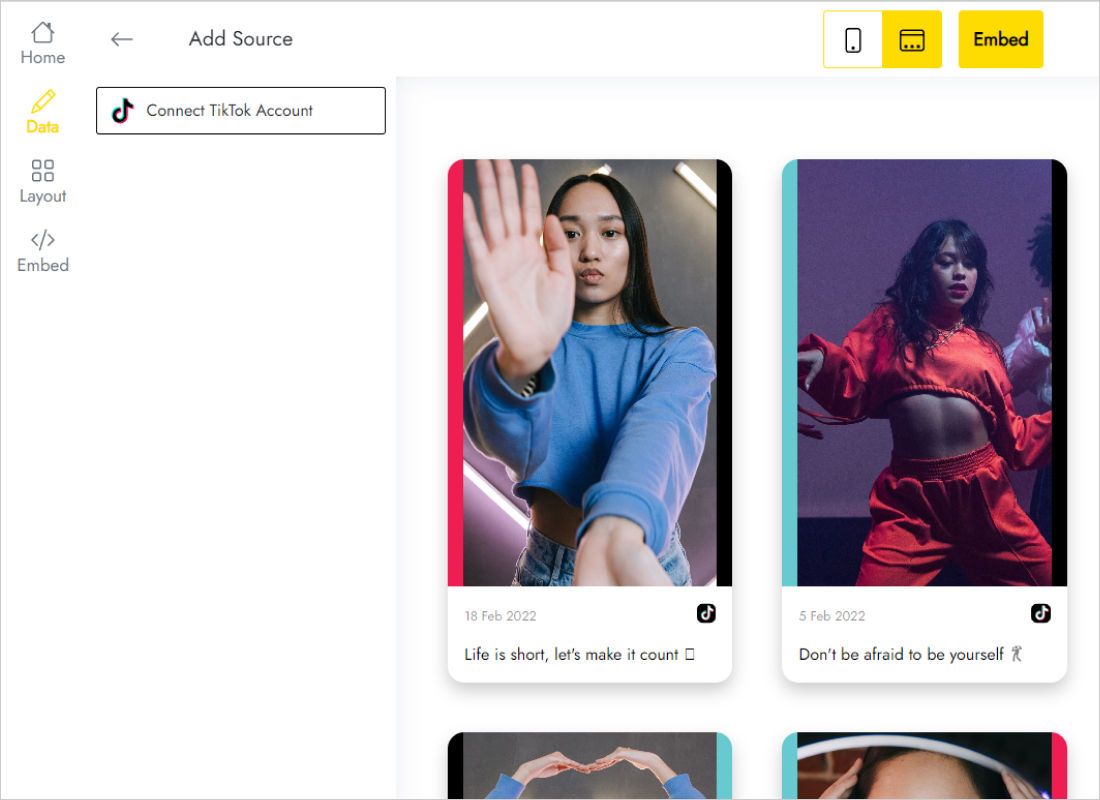
Under Data, click Connect TikTok account, go through the window that opens and allow ElectricBlaze to access your TikTok videos.
-
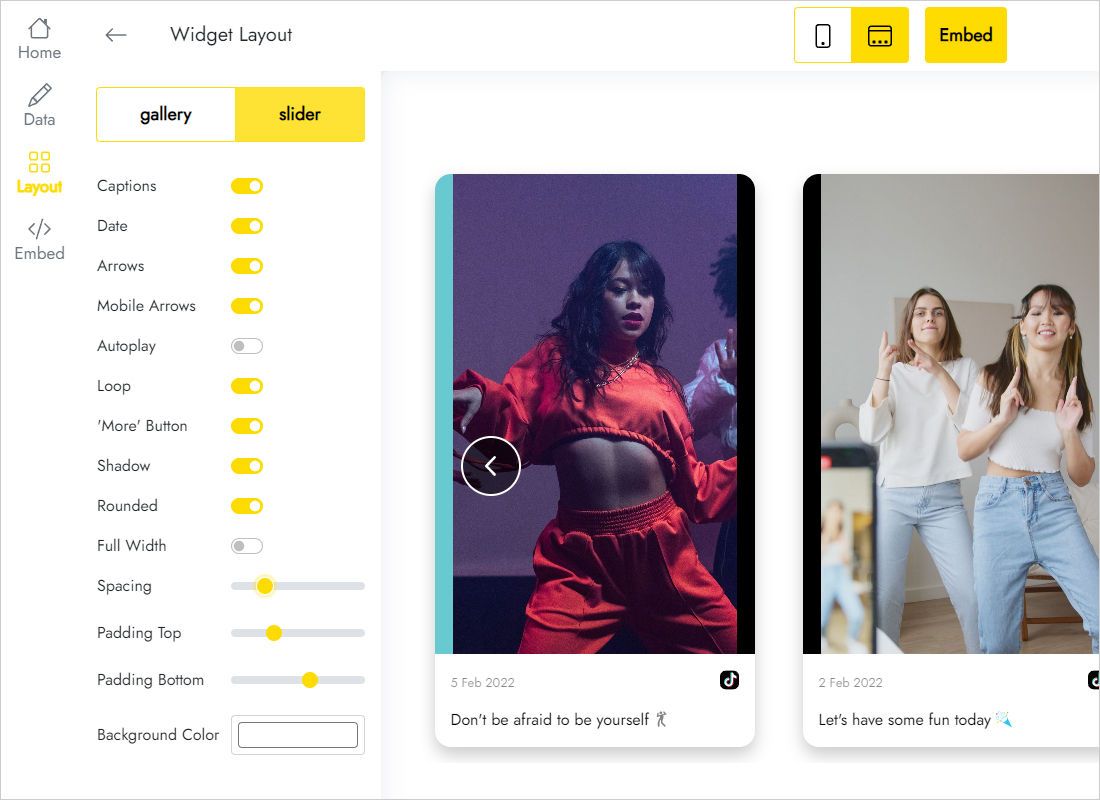
Under Layout, decide between Gallery and Slider, then fine-tune the appearance so it suits your brand.
-
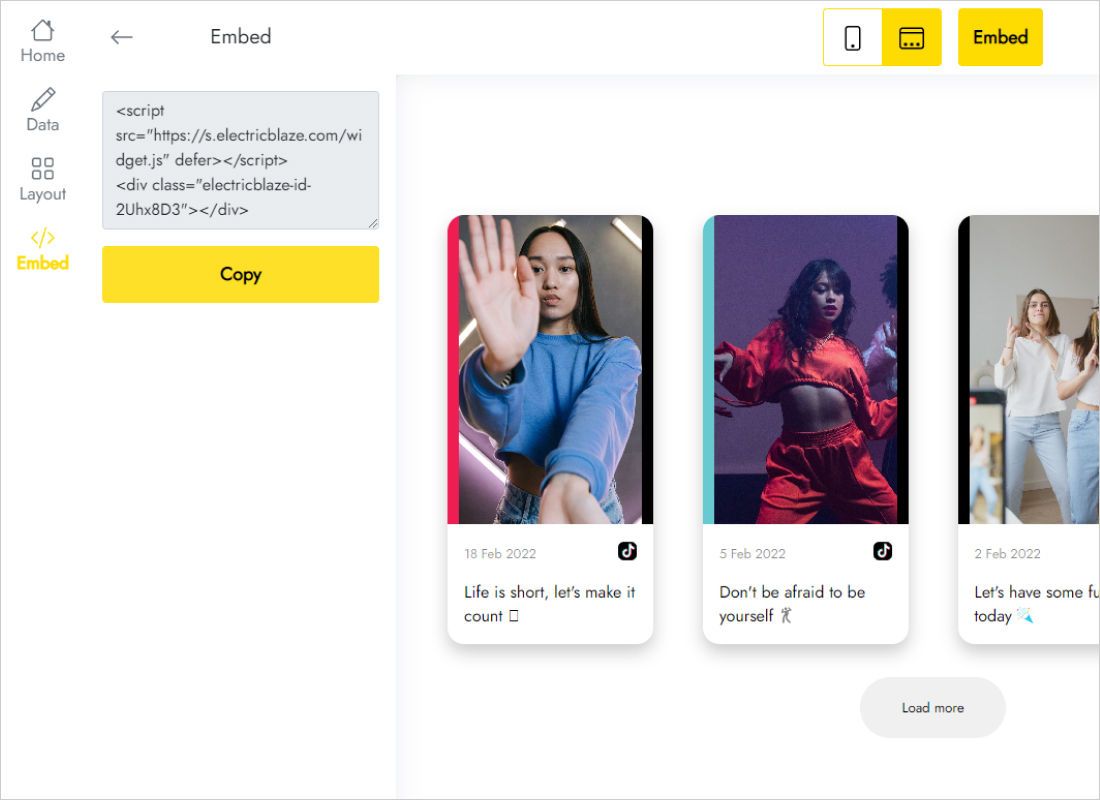
Take the code from Add to website and place it in a custom HTML element of your page. Publish, and the clips go live.
Instructions for popular website builders
Custom code lives in a different menu on each platform. Select yours:
Feed widget vs TikTok embed code for one video
TikTok lets you copy an embed code for a single video from its share menu. That is handy for one clip in a blog post, while a feed covers your whole profile.
| ElectricBlaze TikTok Feed | Native single-video embed | |
|---|---|---|
| Content | Recent videos from your connected profile | One chosen video per code |
| New uploads | Picked up automatically, daily or hourly depending on plan | Copy and paste a fresh code for each clip |
| Layout | Gallery or Slider | A single embedded player |
| Styling | Set in the Layout tab | Fixed TikTok design |
| Maintenance | Restyle or remove once in the dashboard | Edit every page that holds a code |
For one clip, the native share menu does the job. ElectricBlaze works more like a TikTok embed code generator for your entire profile, so the collection stays current without touching the page again. Compare plan limits in our pricing.
See the TikTok feed setup on video
Questions about the TikTok widget
Can you embed TikTok videos on a website?
Yes. You can embed TikTok videos on website layouts individually with code from the share menu, or show a whole profile with a feed widget: link your profile in ElectricBlaze, paste one snippet and recent clips appear in Gallery or Slider view.
How to embed a TikTok video on a website without coding?
Make a TikTok Feed widget, link your profile under Data, and move the code from Add to website into an HTML, Embed or Code block of your builder. No programming is involved; it is a copy-and-paste job.
How do I get TikTok embed code for my whole profile?
TikTok itself hands out code per video. For the full profile, the Add to website button of your ElectricBlaze widget generates one snippet that loads your recent videos and keeps adding new ones.
Why is my TikTok embed code not working?
Common causes are a builder that strips script tags from pasted HTML, a video that was made private or deleted, or a privacy extension blocking the player. Paste the code into a dedicated custom code element and check the page in a normal browser window. If an ElectricBlaze widget does not show, email [email protected].
Is the TikTok feed widget free?
Yes. The Free tier gives you five widgets, 1,000 views every month, unlimited sites and a refresh once a day, and registration asks for no card. Paying $5 a month on a yearly bill (the Start plan) removes the view ceiling and the ElectricBlaze branding and refreshes clips hourly.
How soon do new TikTok uploads show up?
Free widgets pick up new uploads within a day, and Start widgets check for them every hour.
Can the same TikTok feed run on several pages?
Yes. Copy the snippet into as many pages and domains as you want; later edits to the widget update all of them.
What changes when a Start subscription ends?
Nothing disappears: the clips stay visible and a link to ElectricBlaze is attached to the feed. Renew at any point to continue on Start.
How do I get rid of the TikTok feed?
To hide it on one page, delete the snippet there. To remove it from every page, use the Remove widget button in the Data tab; this step is permanent.
Pair it with other widgets
Add photos, long-form video or a music player next to your clips.
Let your TikTok clips work on your site too
Connect your account, select Gallery or Slider and add the snippet. New videos join the feed without another visit to your site editor.
Create TikTok feed