
Facebook Feed Widget for Website: Page Posts on Your Site
Your Facebook Page already carries the news: opening hours, new menus, event dates, sale announcements. A Facebook feed widget for website use brings those posts onto your own site in Gallery or Slider form, so people who never open Facebook still see what is new. Connect the Page once, pick a look, paste the snippet.
This is the real editor running on a sample Page. Switch between Gallery and Slider, play with the parameters and watch the preview react: a working Facebook feed on website example rather than a static screenshot.
Facebook widget for website: key features
What the widget does once a Page is connected, and why each part matters for a local business, club or charity site.
Posts from a public Page you manage
Authorise with Facebook, tick the Page in the list, and its public posts become the source of the feed. Personal profiles and groups stay out, so private conversations never end up on your website.
Gallery or Slider
Gallery lays several posts out at once for a news or community section. Slider shows them one after another in a single band, handy for a homepage strip or a narrow column.
Refreshes on its own
The widget re-reads your Page every 24 hours for Free accounts and every hour for Start subscribers, so an announcement published on the Page reaches the website without logging in to your site editor.
Fits phones and wide screens
The block adapts to whatever width its container has, so one code works in a full-width row, a sidebar or a mobile layout.
A path back to your Page
Posts shown on the site lead readers back to the matching post on Facebook, where they can react, comment or start following the Page.
One embed code for many places
The same Facebook feed embed code can sit on the homepage, the blog and a landing page, or on a second domain. Save a design change in the dashboard and all copies follow.
Facebook page widget for website: Gallery or Slider?
A typical business Page mixes very different posts: an album from last weekend, a text-only notice about holiday hours, a shared link to a local news story. Gallery and Slider handle that mix differently once it sits between your own headings and buttons.
Gallery: a notice board for your news
Gallery places several posts side by side and in rows, much like a board in a shop window. It shines on a separate “News” or “Updates” page, where visitors arrive specifically to catch up, and on community sites that publish often. Because many posts are visible together, one long text announcement does not dominate the section.
Slider: posts in a single row
Slider keeps the feed to a single horizontal band that visitors move through. Pick it for a homepage, where Page updates should support the main offer instead of pushing it down, and for sidebars or footers with limited room. It is also the calmer choice when your Page posts several times a day and a full gallery would feel busy.
Fine-tuning after you choose
Once the layout is set, the Layout tab holds the remaining parameters, such as how many posts are visible, spacing and colours, so the block can match your fonts and palette. Settings are saved with the widget itself, which means the snippet already placed on your site never needs replacing when you change your mind.
Good spots for a Facebook page feed on website layouts
- Restaurant or café homepage: today’s special and weekend events right next to the reservation button.
- Club or school news page: match results, closures and parent notices without running a separate blog.
- Event landing page: a slider of the latest posts about line-ups, tickets and schedule changes.
- Contact page: recent activity shows that someone still runs the place and answers messages.
What Page posts add to your website
More engagement from the same visitors
A static “About us” page gives people one reason to look around. A stream of real Page posts gives them several: photos from yesterday’s event, a question you put to your community, a thank-you to a customer. There is simply more to read, react to and click.
Each post also shows that real people are running the business right now. For a neighbourhood shop or a volunteer group, that signal is often more convincing than any polished slogan in the header.
Visits that keep coming back
When a site shows the same content for months, regular customers stop checking it. With posts arriving automatically, the homepage changes whenever the Page does, and people learn that the website is a reliable place for the latest information.
Posts that link to your own articles, products or booking forms also send readers deeper into the site instead of away from it.
Followers and shares
Visitors who like what they see can open a post on Facebook, follow the Page and pass the news on to friends. Every share places your announcement in front of people who have never seen either the Page or the website.
This matters most for time-sensitive news such as a sale, an opening or a fundraiser, where word of mouth travels faster than search results.
Who puts a Facebook feed on their website
Restaurants, bars and cafés
Daily specials, live music nights and holiday hours usually get posted to social media first. The feed repeats them on the website, right where hungry visitors check the menu, just above photos of the dishes themselves.
Nonprofits and charities
Fundraiser progress, volunteer calls and event photos show donors that their support is at work, placed beside the donation button.
Schools, clubs and sports teams
Coaches and staff already post fixtures, results and closures to the Page. The site picks them up without anyone learning a second publishing tool.
Churches and community groups
Service times, meeting notices and photos from gatherings stay current online even after the volunteer who built the site has moved on.
Local services and trades
Plumbers, gyms, clinics and salons can show finished jobs, offers and schedule changes, which tells a new customer the business is active before they call.
Venues and event organisers
Line-up announcements, ticket news and last-minute changes land on the event page as soon as the feed refreshes, while live commentary posted on X covers the day itself.
How to embed Facebook feed on website
Five steps cover how to add Facebook feed to website pages from scratch. Before starting, make sure your Facebook login has permission to manage the Page you plan to show.
-

Visit a.electricblaze.com to open a free account, with no credit card involved, or to sign back in.
-

Hit Create New Widget; Facebook Feed is one of the types offered.
-
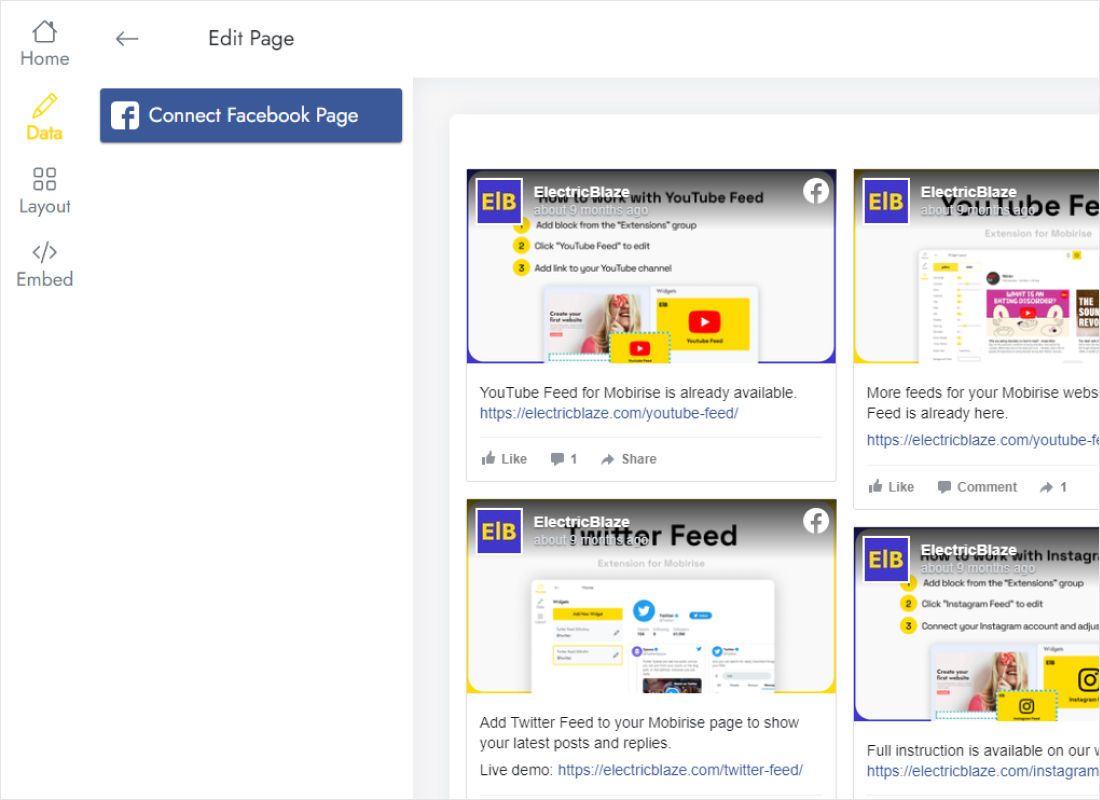
The Data tab has a Connect Facebook Page button. Press it, approve access in the Facebook window and tick the Page whose posts should appear.
-
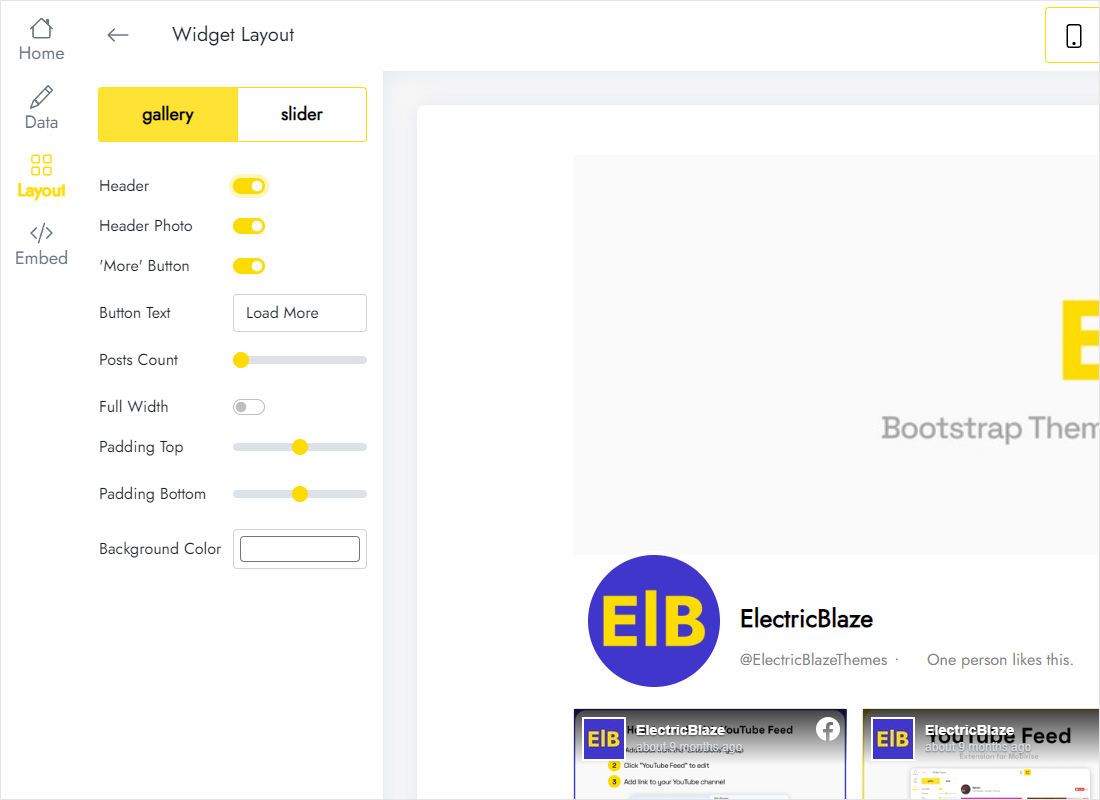
Next comes the Layout tab: decide between Gallery and Slider, then tweak parameters as the preview redraws.
-
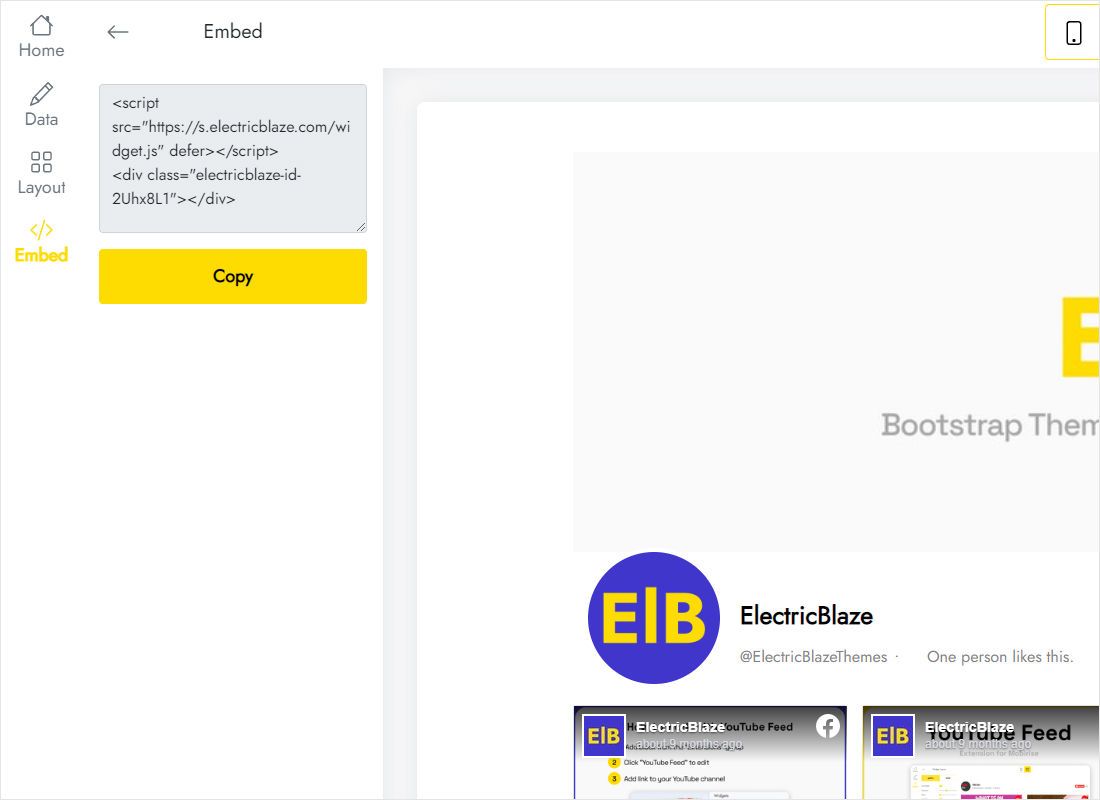
Press Add to website in the top bar to get the code. Drop it into the custom code or embed element of your page, publish, and the posts go live.
Paste the code in your website builder
Builders tuck their code blocks into different menus. These walkthroughs show where to look:
Facebook page plugin or a feed widget?
Meta offers a free Facebook page plugin for website owners: you type a Page URL into its generator and receive an iframe or SDK code that displays the Page timeline, the classic way to embed Facebook timeline on website pages. Here is how that official plugin differs from a feed widget.
| ElectricBlaze Facebook Feed | Facebook Page Plugin | |
|---|---|---|
| Look | Gallery or Slider, parameters set in the editor | Facebook’s own frame with header, cover photo and tabs |
| Width | Follows the width of its container | Between 180 and 500 pixels |
| Content | Posts from the connected Page | Timeline, Events or Messages tab |
| Setup | Authorise once, copy one snippet | Enter the Page URL in the generator, copy iframe or SDK code |
| New posts | Refreshed daily (Free) or hourly (Start) | Loaded from Facebook on each visit |
| Price | $0 on Free; Start is $5/month, paid yearly | Free |
The plugin is fine if a Facebook-styled box in a sidebar is all you need. If the posts should blend with your own design, a widget gives more control. To quote a single post inside an article, Facebook’s embedded post code is enough. See what each plan includes on the pricing page.
Video: setting up the Facebook feed widget
Questions about the Facebook feed widget
What is a Facebook widget?
Broadly, any block of code that brings Facebook content onto another website. Some widgets display only a Like button or one post; a Facebook page posts widget, like this one, pulls the recent posts of a Facebook Page and arranges them in a layout you control.
Can I embed a Facebook group feed on my website?
No. The widget works with public Facebook Pages only. Posts from groups, public or private, and from personal profiles cannot be connected. If your community lives in a group, a Page for official announcements is the usual workaround, and that Page can then be shown on the site.
Why is the Facebook page plugin not working on my site?
Frequent causes are age or country restrictions on the Page, a Page that is unpublished, a width outside the plugin’s limits, and browser extensions or privacy settings that block Facebook frames. When the plugin generator’s Get Code button produces nothing useful, check that the Page URL is correct and publicly visible. If you would rather skip the troubleshooting, a feed widget that reads posts through your Page connection is an alternative.
Can I show my personal Facebook profile instead of a Page?
No, only Pages can be connected. If you post as a person, create a Page for your business or project and publish updates there; the widget will then be able to display them.
Is there a free Facebook widget for website use?
Yes. Without paying anything you get 5 widgets, a monthly allowance of 1,000 views, as many websites as you want and no card on file. Upgrading to Start ($5/month, charged annually) removes the view cap and the ElectricBlaze branding and speeds updates up to hourly.
Where does the Facebook feed embed code come from?
Behind the Add to website button in the editor. It acts as a Facebook feed embed code generator: everything you set on the Layout tab is saved with the widget, and the tab hands you a short snippet. To embed Facebook feed on website HTML by hand, paste it into the page source where the posts belong; in a website builder, use its custom code or embed element.
Do I need admin rights on the Facebook Page?
You need a Facebook account that can manage the Page. The connection is approved on Facebook’s own authorisation screen, and only Pages your account manages are offered for selection.
How long does a new Page post take to reach the website?
It appears after the next automatic update, no later than a day on Free or an hour on Start. Posts you remove on Facebook drop out of the feed after an update too.
Can one Facebook feed appear on several pages or sites?
Yes, reuse the identical code as often as needed, across the pages of one site or on unrelated domains. Any design change you save applies to every copy.
What changes if my Start subscription ends?
Your posts remain visible; the only change is a small ElectricBlaze link that appears beneath the feed. Renewing Start hides it again.
How do I take the Facebook feed off my website?
Taking the code out of a page hides the feed on that page only. Removing the widget itself from its Data tab clears every placement in one move and cannot be undone. Anything unclear? The team at [email protected] can help.
More feeds to pair with your Page posts
Add video from your channel, a photo gallery or a chat button alongside your latest news.
Let your website carry your Facebook news
Open a free account, link your Page and add a single snippet. The next time you post on Facebook, the website follows on its own.
Create Facebook feed