
How to Add Facebook Feed to Blogger
Posts from your Facebook Page can sit next to your articles without any copying by hand. You can add Facebook feed to Blogger in two short stages, placing it in the sidebar of every page or inside one particular post.
Before you start
- Page ownership. Only public Pages you administer can be linked; a personal timeline or a group will not show up in the list.
- ElectricBlaze sign-up. Registering takes a minute and the Free plan needs no card.
- Blog admin role, because authors cannot open the Layout screen.
The feed pulls updates from a public Facebook Page. Blogger just displays the code you paste, so nothing on the blog side needs an app or an account link.
Older tutorials describe a Blogger Facebook Page Plugin setup: dropping Meta's framed timeline into a gadget. That route gives very few styling choices. The ElectricBlaze version lets you switch between gallery and slider, hide captions and colour the background to blend with your theme.
Step 1: Build the Facebook widget
All settings are covered in the guide to Facebook card layouts. For a blog, five clicks do it:
-

Visit a.electricblaze.com; returning users log in, newcomers register.
-

From the dashboard, start a new widget and mark Facebook Feed as its type.
-
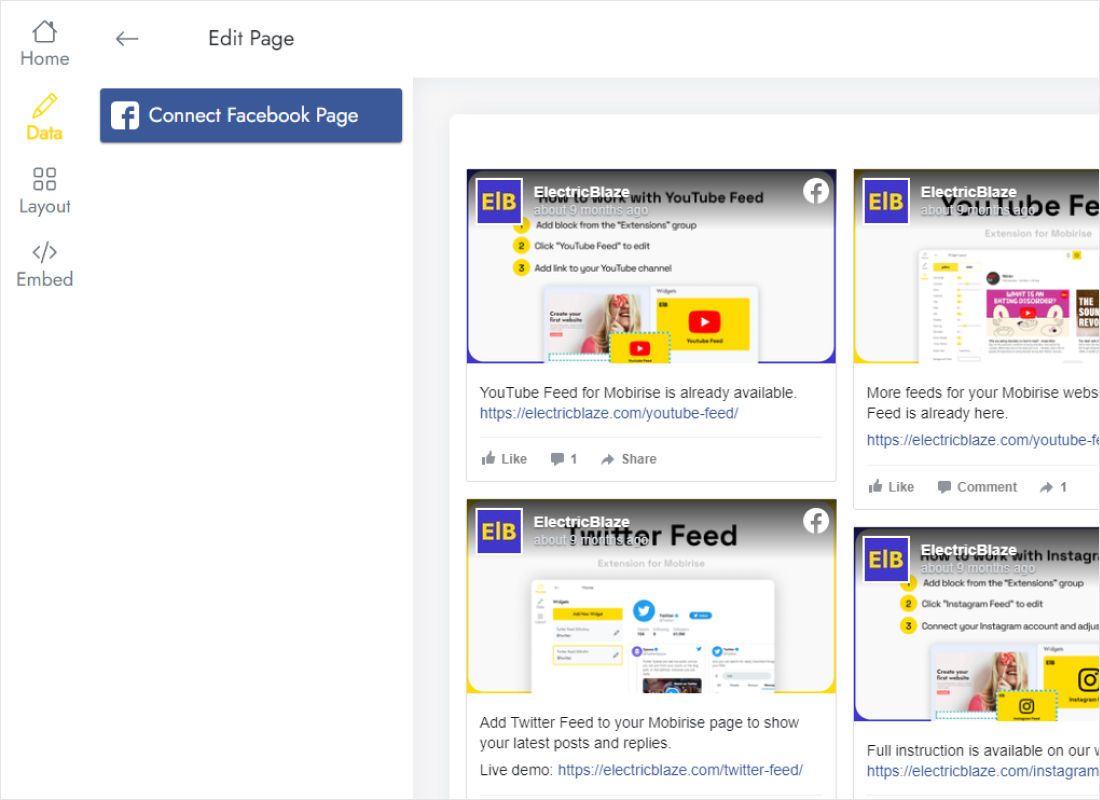
Stay on Data, press Connect Facebook Page, confirm your Facebook login and tick the Page you run for the blog.
-
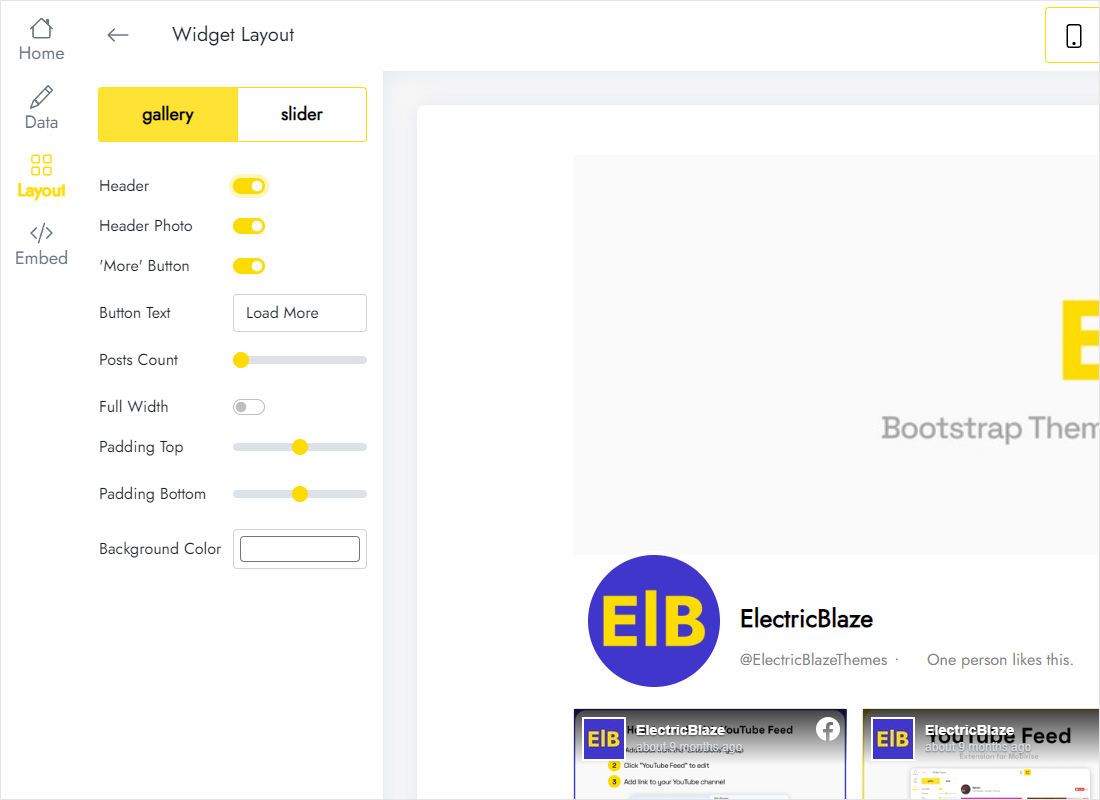
Move to Layout. A sidebar gadget wants a single column; a post has space for two or three.
-
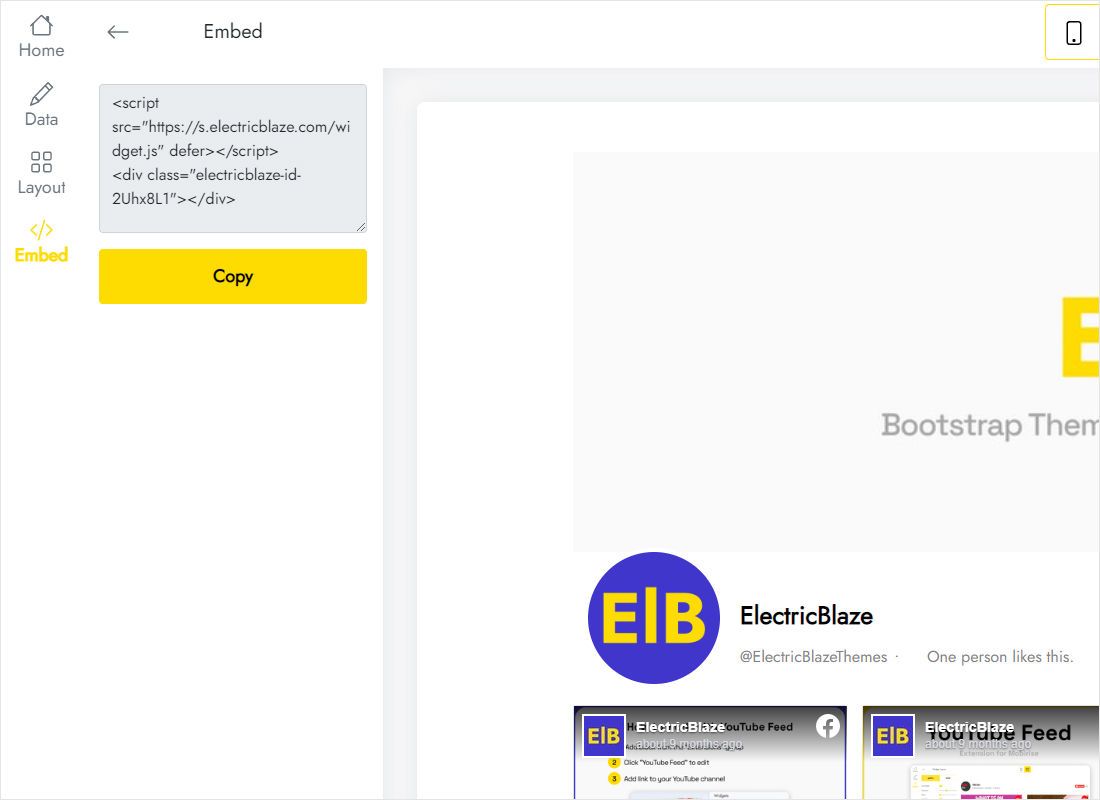
Hit Add to website at the top of the editor, then grab the snippet with the copy button.
Step 2: Drop the snippet into a gadget
Gadgets repeat on all blog pages, which suits a social sidebar:
- Sign in at blogger.com, choose the blog and open Layout.
- In the Sidebar section click Add a Gadget, then pick HTML/JavaScript.
- Enter a heading such as “Latest on Facebook” or leave it blank, paste into Content and click Save.
- Drag the gadget up or down within the section to set its position.
- Load the blog in a fresh browser tab and check that Page updates appear.
Want the updates inside a single article instead? Open that post, flip the editor to HTML view, drop the snippet between paragraphs and click Update.
Fitting Facebook updates into the sidebar
Sidebar gadgets inherit the width of their column, which is narrow in most themes. A single column stacked two or three cards deep, or a slider showing one card, keeps text legible. Extra columns squeeze each image into a thumbnail.
- Footer sections that stretch across the page can carry a three-column grid.
- Captions make cards tall when your updates are long. Hide them in a sidebar and keep them in a post, where there is room.
- Phones. If the blog uses the separate mobile theme, gadgets may disappear. Put a copy in a post, or switch mobile visitors to the desktop theme under Theme settings.
- Cover photo. The widget lists posts, not the Page banner. Use an Image gadget if you also want the cover on the blog.
Whatever you publish on the Page shows up on the blog automatically; Free plans pull new posts daily, Start plans hourly.
Facebook posts on Blogger: FAQ
How to add Facebook Page to Blogger without the Page Plugin?
Link the Page inside an ElectricBlaze widget, copy its snippet and paste that into an HTML/JavaScript gadget. Nothing needs configuring on the Meta side.
Is it possible to use my personal timeline?
No. Facebook shares public Pages only with outside apps, so set up a Page for the blog if you do not have one yet.
Why does the feed look cramped next to my articles?
The gadget column is narrower than the layout expects. Reduce columns to one, or move the gadget into a full-width footer section.
Does this cost anything?
Blogger charges nothing for gadgets. On the ElectricBlaze side, Free covers five widgets, enough for an Instagram photo gadget beside this one, and a thousand monthly views on as many blogs as you like.
More Blogger guides
Other widgets for your blog, the full setup guide and the Facebook widget overview:
Create your Facebook widget
Link your Page and paste one snippet into a Blogger gadget; the updates keep flowing on their own.
Create a widget