
How to Add HTML to Blogger Posts, Gadgets and Themes
Blogger accepts outside code in three places, and each one suits a different job. This guide explains how to add HTML to Blogger for an ElectricBlaze widget, which of the three spots to choose and what to check when the widget stays invisible.
Where Blogger accepts embed code
An ElectricBlaze snippet is a little markup plus a script tag. You can paste that kind of Blogger embed code into:
- The HTML view of a post or page. The code appears inside a single article, exactly where you drop it. Good for an About page or one story.
- An HTML/JavaScript gadget (Layout, then Add a Gadget). The code sits in a sidebar, header or footer section and repeats across the whole blog. This is the usual answer to how to add widgets to Blogger, and it costs nothing.
- Theme, then Edit HTML. The code loads from the template itself, just above the closing body tag. Reserve it for elements that float over the page, such as a chat button.
All three work on free Blogspot addresses and on custom domains; there is no paid tier to unlock. When you only need to embed HTML in Blogger for one article, the post editor below is the fastest route.
Insert widget code into a post
This is how to add HTML code in Blogger post content. Copy the snippet from the Add to website button in the ElectricBlaze editor, then:
-
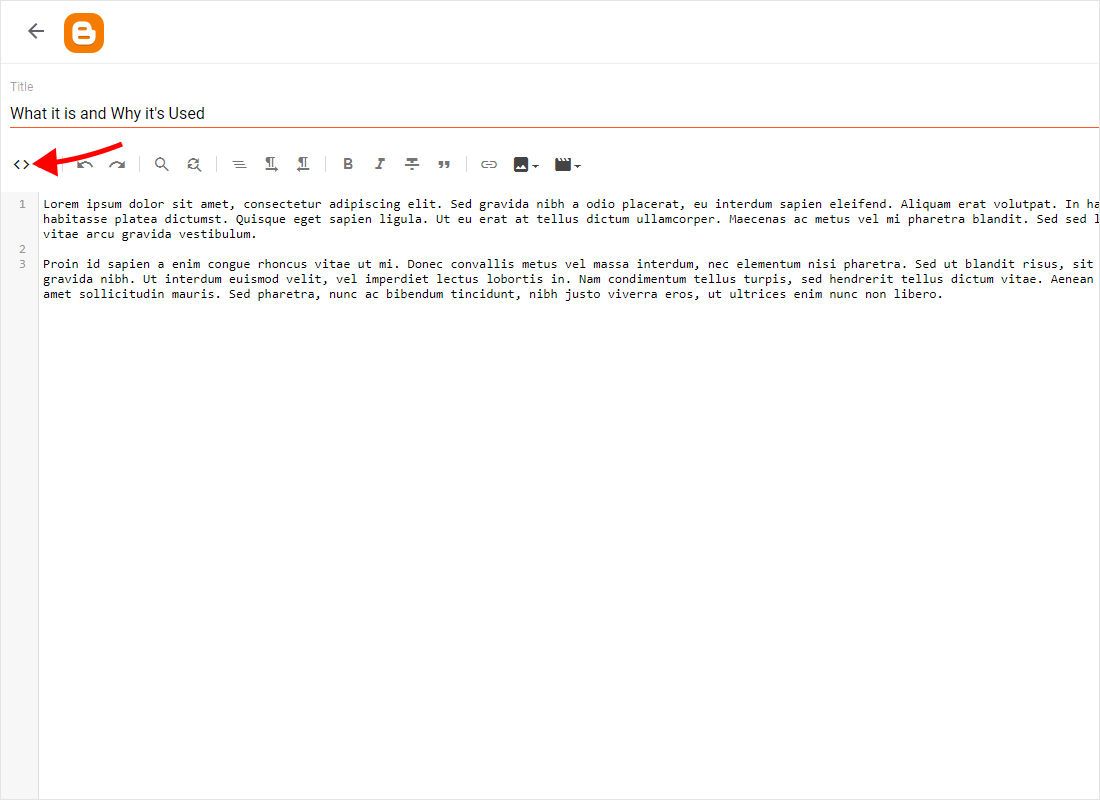
Open the post that should display your widget and use the view switcher in the top-left corner of the editor to change how the content is shown.
-
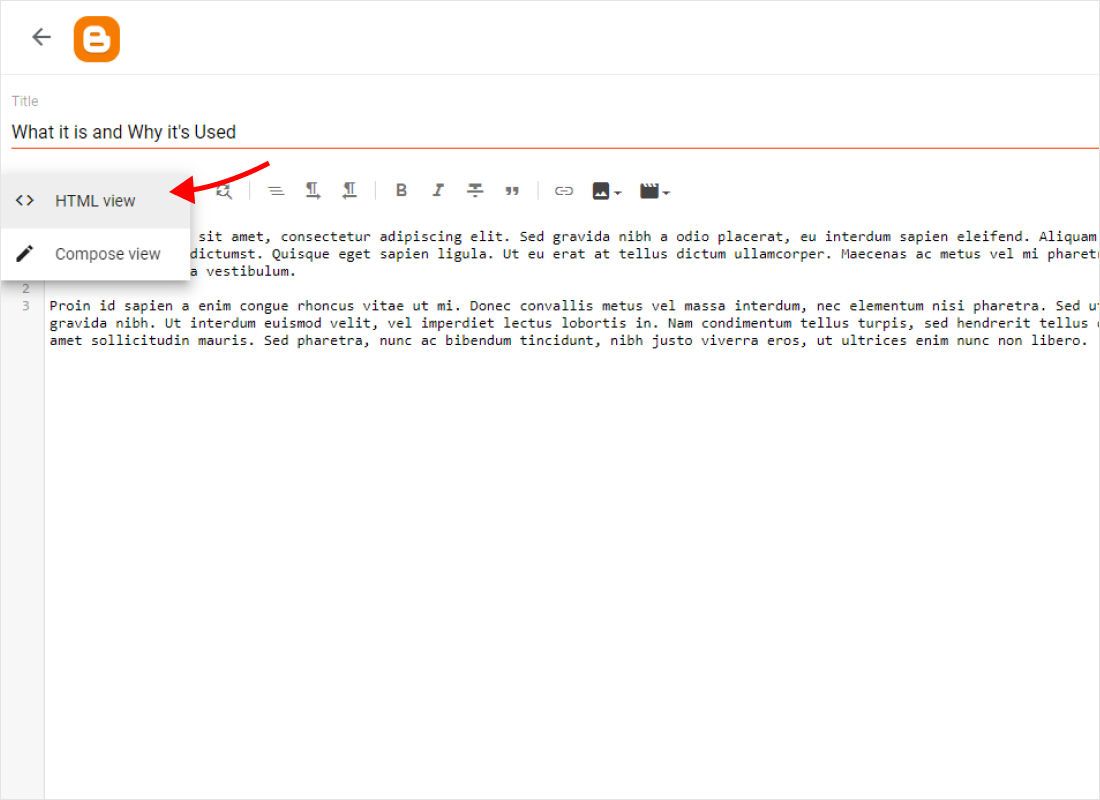
Pick HTML view. Formatted text turns into raw markup you can edit directly.
-
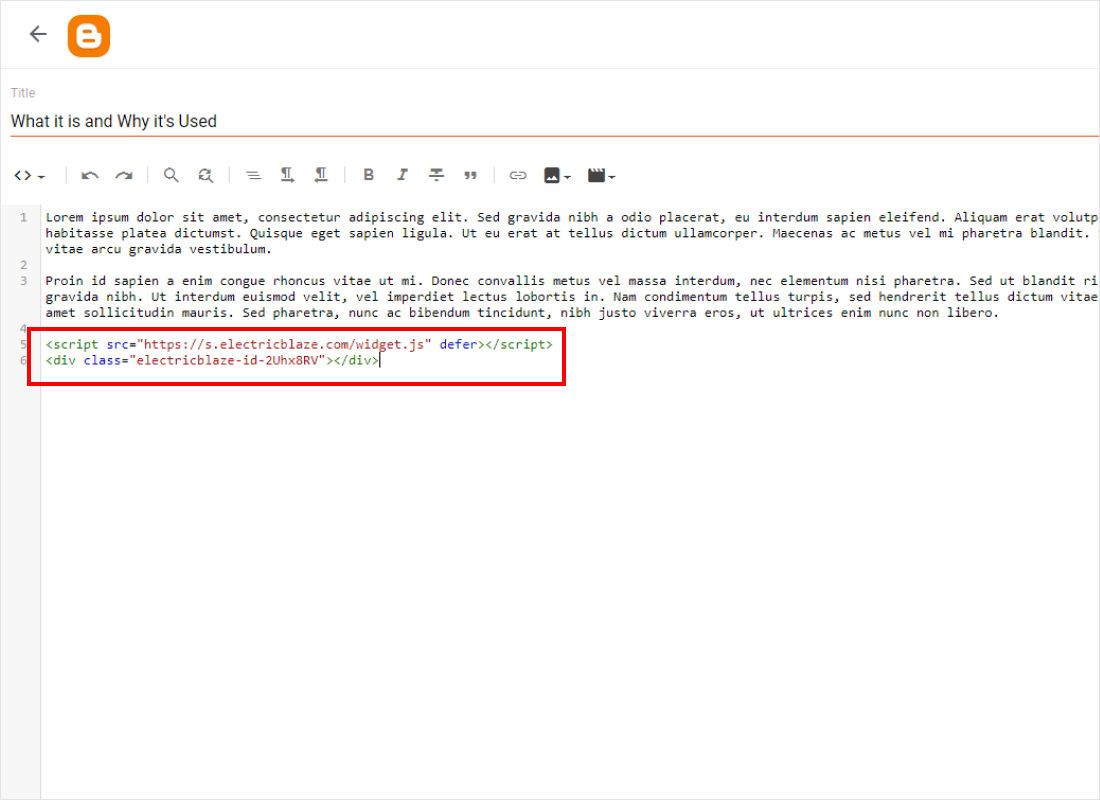
Place the cursor where the widget belongs, paste the snippet and click Update (or Publish for a draft). Press Preview if you want to see it running before readers do.
Static pages use the same editor, so these steps work there too.
Choosing a spot for each widget type
Sidebar, header and footer gadgets
On the Layout screen, click Add a Gadget in the section you want, choose HTML/JavaScript, paste the snippet into the Content box and save. Leave Title empty to skip the heading. Blogger HTML widgets like this take the width of their column: a narrow sidebar fits a one-column gallery or a slider, while a footer area that spans the page can carry a wider grid.
Theme code for floating buttons
Popup Chat and the floating Music Player stick to a corner of the window. Open Theme, use the arrow beside Customize, choose Edit HTML, find the closing body tag and paste the snippet on the line above it. Themes are strict XML: an attribute without a value, such as a bare defer, can block saving. Write it as defer="defer" and save again.
Readers on phones
Some blogs still serve Blogger's separate mobile theme, which drops most gadgets. Mobile settings in the same Theme menu can show the desktop theme on phones instead. Code inside a post body is unaffected.
Widget missing on the blog: checks
- The code shows up as plain text. It went in while Compose view was active. Delete it, switch to HTML view and paste once more.
- Layout shows only a grey box. Layout draws placeholders; open the blog itself.
- Fine on a laptop, gone on a phone. The mobile theme hides that gadget; see Readers on phones above.
- Theme refuses to save. The XML parser found an attribute without a value or an unclosed tag. Fix it, or use a gadget instead.
- Script stripped after an edit. Saving in Compose view can rewrite it, as with any Blogger iframe embed, so edit those posts in HTML view.
Later changes made in ElectricBlaze reach readers without another edit in Blogger.
Widget guides for Blogger
Each guide covers one widget, the gadget width that suits it and the settings to change first.
-
How to add Instagram Feed to Blogger
-

How to add TikTok Feed to Blogger
-

How to add YouTube Feed to Blogger
-
How to add Twitter Feed to Blogger
-
How to add Twitch Feed to Blogger
-
How to add Facebook Feed to Blogger
-
How to add Popup Chat to Blogger
-

How to add Music Player to Blogger
-

How to add Pinterest Feed to Blogger
-

How to add Vimeo Feed to Blogger
-
How to add Simple Shop to Blogger
Blogger embed code: questions
How to add HTML in Blogger without risking the theme?
Use the post HTML view or an HTML/JavaScript gadget. Neither touches the template, so a mistake is easy to remove. Before any Edit HTML work, save a copy through Theme, then Backup.
How to embed code in Blogger so it appears on every page?
Put it into a gadget in a sidebar, header or footer section, or into the template above the closing body tag. Code inside a post appears only on that post.
Are Blogger widgets free?
The HTML/JavaScript gadget is a built-in feature with no charge. For Blogger widgets free of cost from ElectricBlaze, the Free plan covers 5 widgets, 1,000 views a month and unlimited sites; Start removes the branding and the view cap.
Is there a Blogger insert code block button?
Not as a separate button. HTML view plays that role for posts and the HTML/JavaScript gadget does it for layout sections. To show code as text, wrap it in pre tags.
How to add HTML code in Blogger headers?
Many themes show an Add a Gadget link in the header area of the Layout screen. A slider with one row fits there; a tall grid pushes your latest posts down.
Build a widget for your blog
Create one for free, copy the snippet and paste it into a post or gadget in a few minutes.
Create a widget