
How to Embed a Widget in HTML Pages
Wondering how to embed a widget in HTML on a hand-coded or custom-built site? You only need a text editor and access to your files. This page explains exactly where the snippet goes, how floating widgets differ from inline ones, and what changes in templates and JavaScript frameworks.
What the embed code is
An ElectricBlaze widget arrives as a short HTML website embed code: a placeholder element plus a small script. The script loads asynchronously, finds the placeholder and draws the feed, player or button inside it. There is no library to install.
You get the snippet from the widget editor: open the widget and click Add to website in the top bar. Copy it exactly as shown.
If you have been searching how to add HTML to website pages in general, the rule is simple: markup renders where it sits in the document. Put the snippet where the widget should appear, and it appears there.
How to embed code in HTML files
To embed the code in a static site, follow these steps. CMS and framework notes come further down.
-
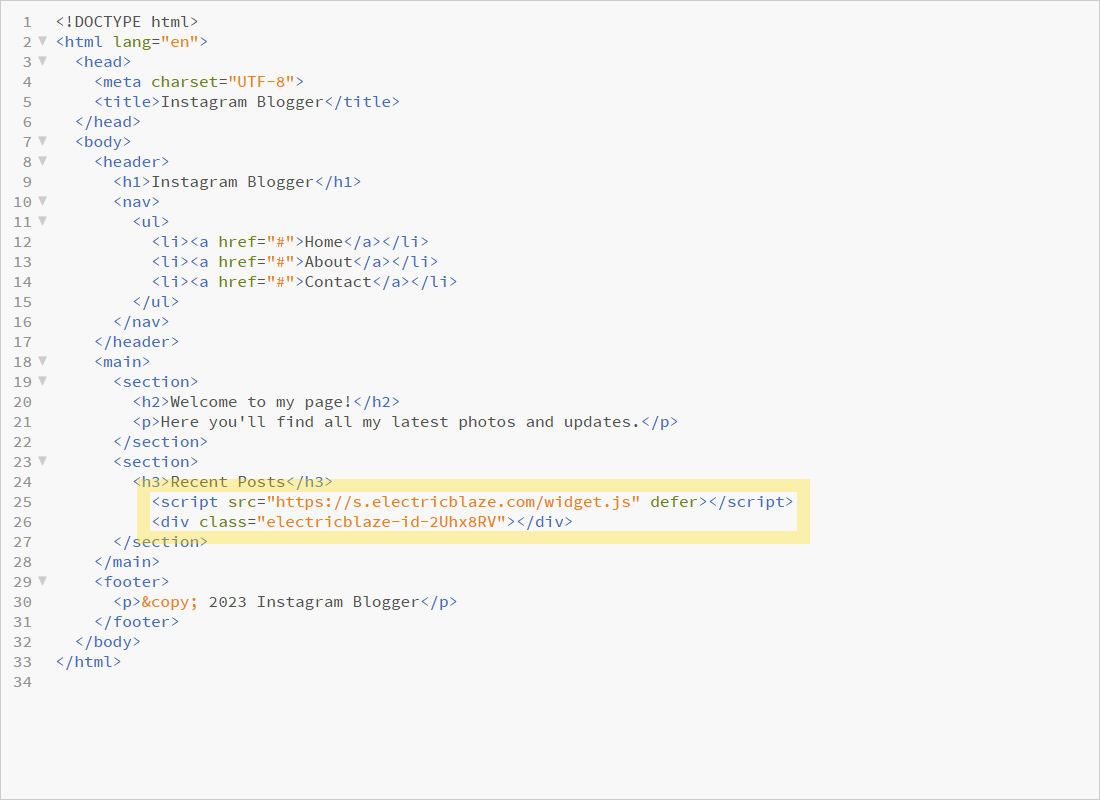
Open the page file in your code editor and paste the snippet at the spot inside the body where the widget should show.
-
Save the file and upload it to your server over FTP, Git deployment or your hosting file manager.
-
Open the page in a browser, refresh without cache, and check desktop and mobile widths with the developer tools device toolbar.
Paste the snippet as-is. Changing attribute values or merging it into a minified bundle can stop the script from finding its placeholder.
Where to embed it in the markup
Inline widgets: feeds, shop
Put the code inside the container that controls its width, for example a section or a column. The widget fills the width of its parent, so a 1200-pixel wrapper gives a wide gallery and a sidebar gives a narrow one.
<section class="social">
  <h2>Latest posts</h2>
  <!-- inline widget snippet -->
</section>

<!-- floating widget snippet -->
</body>
Floating widgets: chat, sticky player
Embed them, for example a WhatsApp chat bubble, just before the closing body tag. They position themselves over the viewport, so their spot in the source only needs to be on every page. On a site with a shared footer file, that file is the natural place.
Templates, includes and CMSs
In PHP includes, static site generators such as Hugo or Eleventy, or a CMS theme, add the code to the template or partial that renders the target area. In WordPress use a Custom HTML block; in Elementor, the HTML element.
Single-page apps
React, Vue and similar frameworks swap views without reloading, so a script that ran once may not run again after a route change. Render the snippet in a component that stays mounted, or load it on the route where it belongs and test navigation back and forth.
Embed not showing? Check these
- Content Security Policy. A strict CSP header blocks outside scripts. Add the domains the widget requests (listed in the Network tab) to the policy.
- Snippet split by an editor. Some WYSIWYG fields strip script tags. Switch to a code or source view before pasting.
- Placeholder hidden. A parent with zero height or
display:nonehides the widget. Inspect it in developer tools. - Relative path confusion. Edited the local copy but uploaded a different file? Compare the live source with View Source.
- Old page in cache. Purge the CDN or hosting cache after uploading.
Open the browser console: a red error mentioning the script usually points to the cause. Send it to [email protected] if you are stuck.
Per-widget guides for hand-coded sites
Specific notes for each source: container width, grid or slider, and where to embed floating code.
-

How to add Instagram Feed to HTML / Custom
-

How to add TikTok Feed to HTML / Custom
-

How to add YouTube Feed to HTML / Custom
-

How to add Twitter Feed to HTML / Custom
-

How to add Twitch Feed to HTML / Custom
-

How to add Facebook Feed to HTML / Custom
-

How to add Popup Chat to HTML / Custom
-

How to add Music Player to HTML / Custom
-

How to add Pinterest Feed to HTML / Custom
-

How to add Vimeo Feed to HTML / Custom
-

How to add Simple Shop to HTML / Custom
Embed code in HTML: FAQ
How to add widget in HTML code without JavaScript skills?
Copy and paste is all it takes. The script is already written; you only choose the position in the file.
How to include HTML in HTML, for example a shared header?
Browsers have no native include tag. Use server-side includes, a static site generator, or an iframe. Our snippet does not need that, since it loads its own content.
Is there an HTML embed code generator for these widgets?
The ElectricBlaze editor is the generator: configure the layout and it outputs ready code.
Can I embed a widget in an Outlook email or a Word document?
No. Email clients and office documents do not run scripts. Link to the web page that hosts the widget instead.
Can I use an iframe instead?
Not needed. The widget renders straight into your page, so its height follows the content, while an iframe needs a fixed height set by hand.
Get your widget snippet
Build it for free and paste the code into any HTML page in a minute.
Create a widget