
How to Add HTML and Widget Code to Google Sites
Yes, you can add HTML to Google Sites without a paid plan or a developer. The editor accepts HTML, CSS and JavaScript through its Embed tool. This guide walks through the clicks, explains the frame your markup lives in and shows how ElectricBlaze widgets behave there.
What the Embed tool really does
This builder has no theme editor, header script field or plugin store. The only doorway for outside markup is Insert → Embed, a dialog with two tabs: By URL for pages that permit framing, and Embed code for raw HTML. Whatever you paste there is wrapped in a sandboxed iframe served from a Google content domain.
That answers most questions about how to use HTML in Google Sites:
- It is free. Any Google account can build a site and use Embed.
- JavaScript runs when placed inside script tags; CSS goes inside style tags.
- The HTML is boxed. It cannot restyle your theme or pin a button to the browser corner.
- Each embed belongs to one page. No site-wide injection exists.
Paste embed code for Google Sites step by step
Copy your widget snippet from the Add to website button in the ElectricBlaze editor first. Then:
-
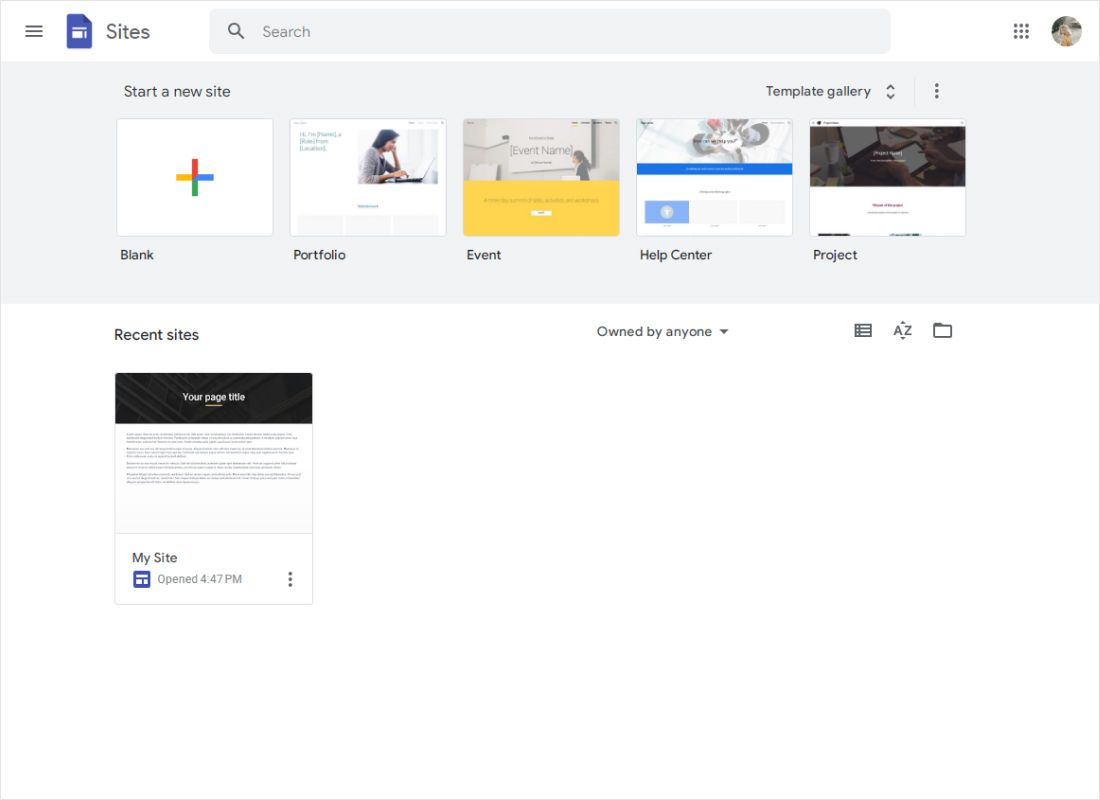
Open the Sites home screen, signed in with an account that can edit the project, and pick it under Recent sites.
-

Go to the target page, click an empty spot below the content and choose Embed in the Insert panel on the right.
-
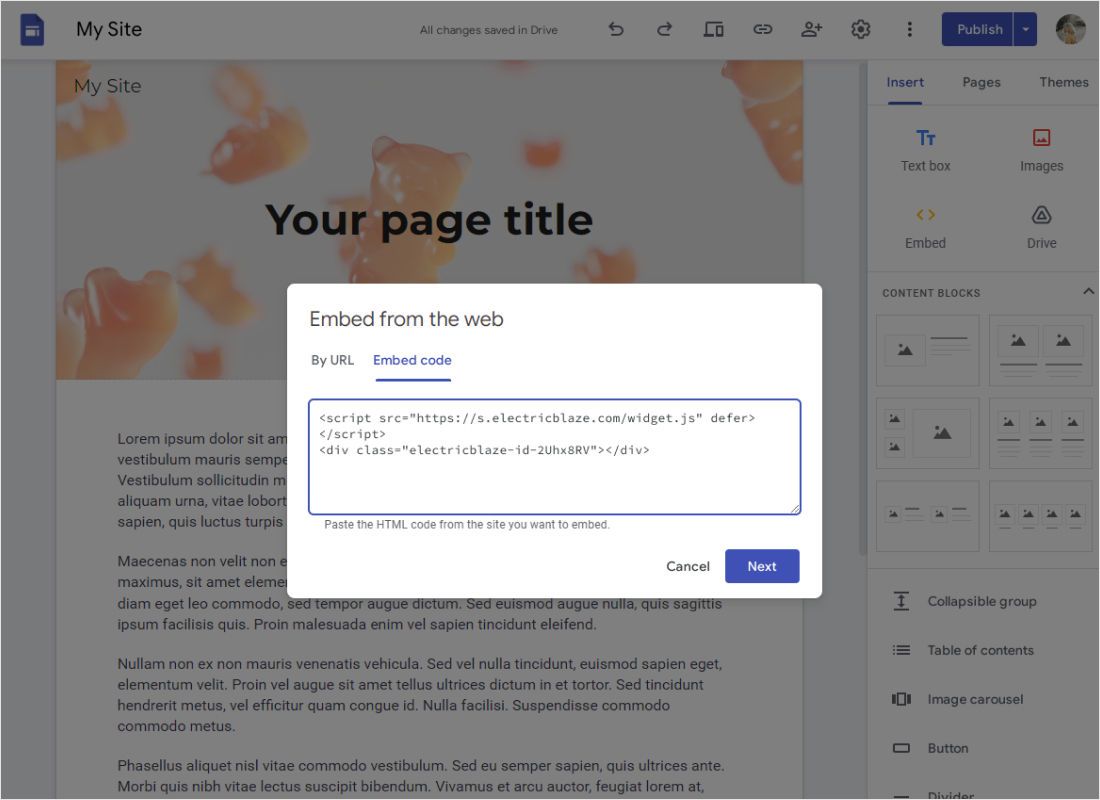
In Embed from the web switch to Embed code, paste the HTML snippet and click Next, then Insert after the preview.
-

Drag the frame handles until the widget fits and press Publish. Visitors get the live result, like the photo slider shown here.
Sites published only inside a school or company domain work the same, but viewers must be signed in to that domain.
Sizing and placing Google Sites embed widgets
Feeds: layout first, frame size second
An embed frame does not grow with its content. A one-row slider of recent YouTube lessons wants a short, wide box; a three-row grid of portfolio videos from Vimeo wants a tall one. Settle the layout in ElectricBlaze, then stretch the frame until no inner scrollbar is left.
Music Player: use embed mode
Floating mode pins a player to the corner of the browser window. Inside a sandboxed iframe that window is just the embed rectangle, so switch the widget to embed mode.
Several pages, phones
Paste the identical HTML into an Embed on each page; every copy reads from one widget. Sections collapse into a single column on phones, so check the published page on a small screen.
Embed in Google Sites not working? Checks to run
- Pasted on the wrong tab. By URL expects an address; script-based HTML belongs on Embed code.
- Cut off or scrolling inside. Enlarge the frame or reduce rows in the widget.
- Visitors see the old page. Editor changes stay in draft until you click Publish.
- Blank on a school or office network. Filters set by administrators can block third-party content.
New posts or colour changes arrive from ElectricBlaze automatically; republish only after moving or resizing the frame.
Widget walkthroughs for Google Sites
Pick a widget to see which account it connects and a sensible frame size to start from.
-

How to add Instagram Feed to Google Sites
-

How to add TikTok Feed to Google Sites
-

How to add YouTube Feed to Google Sites
-

How to add Twitter Feed to Google Sites
-

How to add Twitch Feed to Google Sites
-

How to add Facebook Feed to Google Sites
-

How to add Popup Chat to Google Sites
-

How to add Music Player to Google Sites
-

How to add Pinterest Feed to Google Sites
-

How to add Vimeo Feed to Google Sites
-

How to add Simple Shop to Google Sites
HTML and embeds in Sites: FAQ
Can you add HTML to Google Sites with a free personal account?
Yes. Embed code is part of the free editor, and school or business Workspace accounts get the same tool.
Does Google Sites allow custom code in the page head?
No. There is no field for head tags or site-wide scripts; custom HTML runs only inside individual embed frames.
Can you embed Python code in Google Sites?
Not directly. Embed code runs HTML, CSS and JavaScript in the browser. Python needs an outside service that executes it and offers an HTML snippet.
What does embed mean on Google Sites?
Showing content from another service inside your page instead of linking to it. It keeps loading from its source, so it stays current.
Is ElectricBlaze a free embed code generator for Google Sites?
The Free plan builds up to 5 widgets with 1,000 views a month on unlimited sites. Start, $5 a month billed yearly, removes the view limit and branding.
Create a widget for your Sites page
Sign up at no cost, design the widget, then paste its code through Insert → Embed.
Create a widget